To establish communication between a Schneider ATV320 drive and an M340 PLC using Control Expert (formerly Unity Pro), follow these steps:
Hardware Setup: Connect the ATV320 to the M340 PLC using Modbus RTU (RS485) or Modbus TCP/IP (Ethernet) based on the available communication options. Ensure proper wiring, IP addressing (for Ethernet), or serial communication parameters (for RS485). ATV320 Configuration: Configure communication settings (Modbus address, baud rate, parity, or IP address) via the drive's keypad, SoMove software, or Web Server. Set the control mode to enable network control. M340 PLC Configuration in Control Expert: Create a new project and configure the communication module (e.g., BMXNOC for Ethernet or serial communication modules for RS485). Define the ATV320 as a Modbus device (Slave for RTU or TCP/IP). Control and Monitoring Setup: Map the required Modbus registers for control (start/stop, speed setpoint) and feedback (status, frequency). Use READ_VAR and WRITE_VAR functions or Schneider’s prebuilt DFBs (Derived Function Blocks) for communication logic. Testing and Validation: Verify communication using diagnostic tools in Control Expert. Test the control and feedback by sending commands to the drive and reading its status.Learn PLC programming,Free SCADA programming, Download free PLC books, Free manuals,PLC tutorials,PLC presentation.
January 7, 2025
Scheider ATV 320 drive communication with Schneider PLC M 340 using control expert
January 6, 2025
Top Applications of Pneumatic Systems in Modern Industry
Pneumatic systems are an integral part of modern industry, offering efficient, reliable, and cost-effective solutions for a wide range of applications. These systems utilize compressed air to perform mechanical work, making them ideal for industries that require automation, precision, and safety. In this article, we explore the top applications of pneumatic systems in modern industry and how they drive innovation and efficiency.
1. Industrial Automation
Industrial automation is one of the most prominent applications of pneumatic systems. Pneumatic actuators, cylinders, and valves are used in assembly lines, robotic arms, and conveyor systems.
- Robotics: Pneumatics powers robotic grippers for precision handling of components.
- Packaging: Automated packaging machines rely on pneumatic systems for tasks such as sealing, labeling, and sorting.
- Material Handling: Pneumatic systems move heavy or delicate materials with ease, reducing the risk of damage.
Key Benefit: The reliability and quick response of pneumatic systems make them indispensable in high-speed production environments.
2. Transportation and Automotive Industry
Pneumatics plays a critical role in the transportation and automotive sectors.
- Air Brakes: Trucks, buses, and trains utilize air brake systems for reliable and safe stopping power.
- Vehicle Assembly: Pneumatic tools are used in car manufacturing for tasks like fastening, painting, and welding.
- Suspension Systems: Pneumatic air suspension improves ride quality and load handling.
Key Benefit: Pneumatic systems offer safety and precision in vehicle operation and manufacturing.
3. Food and Beverage Industry
The food and beverage industry demands high levels of hygiene and precision, making pneumatic systems an ideal choice.
- Filling Machines: Pneumatic systems control the precise filling of bottles and packages.
- Processing Equipment: Pneumatics ensures contamination-free handling of food products.
- Packaging: Applications like vacuum sealing and carton folding rely on pneumatic solutions.
Key Benefit: Compressed air is clean and safe, ensuring compliance with food safety standards.
4. Healthcare and Medical Devices
Pneumatics is widely used in the healthcare sector for its reliability and quiet operation.
- Medical Tools: Devices like dental drills and surgical instruments are powered by compressed air.
- Patient Care: Pneumatic systems are used in ventilators and hospital beds for smooth operation.
- Pharmaceuticals: Pneumatics control equipment used in drug manufacturing and packaging.
Key Benefit: Pneumatic systems provide precision and safety in critical healthcare applications.
5. Construction and Mining
The rugged environment of construction and mining benefits significantly from pneumatic tools and equipment.
- Jackhammers: Pneumatic hammers break through concrete and rock efficiently.
- Drills: Air-powered drills are used for underground mining operations.
- Lifting Equipment: Pneumatic hoists provide safe and efficient material handling.
Key Benefit: Durability and power make pneumatics ideal for heavy-duty tasks.
6. Textile Industry
In textile manufacturing, pneumatic systems are used for automation and precision control.
- Weaving Machines: Pneumatics controls the looms for consistent fabric production.
- Dyeing: Pneumatic valves regulate dyeing processes with high accuracy.
- Cutting and Stitching: Air-powered tools enhance productivity in garment production.
Key Benefit: Improved efficiency and precision in textile processes.
7. Energy Sector
Pneumatic systems support energy production and distribution processes.
- Oil and Gas: Pneumatic actuators and valves control pipelines and drilling equipment.
- Renewable Energy: Wind turbines use pneumatic braking systems for speed control.
Key Benefit: Reliability in critical energy applications.
January 4, 2025
The Basics of Pneumatics: Understanding Compressed Air Systems
Pneumatics is a fascinating field of engineering that leverages compressed air to perform mechanical work. From industrial automation to everyday tools like air-powered drills, pneumatic systems are a cornerstone of modern technology. This article explores the basics of pneumatic systems, their components, and their applications.
What Is a Pneumatic System?
A pneumatic system uses compressed air to generate mechanical motion. Unlike hydraulics, which rely on liquids, pneumatics employs air or other gases. These systems are popular because air is abundant, clean, and easy to compress.
Key Components of Pneumatic Systems
Air Compressor
The air compressor is the heart of a pneumatic system. It takes in atmospheric air, compresses it, and delivers it at high pressure for various uses. Compressors are available in types like reciprocating, rotary screw, and centrifugal models.Air Storage Tank
The compressed air is stored in an air receiver tank to stabilize pressure and ensure a steady supply. This component also helps reduce the workload on the compressor.Valves
Pneumatic valves control the flow, pressure, and direction of compressed air. Types include:- Directional control valves: Manage airflow direction.
- Pressure relief valves: Protect the system from overpressure.
- Flow control valves: Regulate airflow rate.
Actuators
Pneumatic actuators convert compressed air into mechanical motion, such as linear or rotary motion. Examples include cylinders (linear actuators) and rotary actuators.Air Treatment Units
To ensure system longevity, air must be clean and dry. Filters, regulators, and lubricators (collectively called FRLs) prepare air for use.
How Pneumatic Systems Work
- Air Compression: The compressor compresses ambient air.
- Storage: The air is stored in a tank at high pressure.
- Control: Valves regulate the airflow to match system requirements.
- Actuation: Actuators perform work, such as lifting, pushing, or rotating.
- Exhaust: After use, the air is released into the atmosphere.
Advantages of Pneumatic Systems
- Cost-Effective: Air is free, and components are relatively inexpensive.
- Safe: Pneumatic systems are less prone to catastrophic failure compared to hydraulic systems.
- Clean: Ideal for food and pharmaceutical industries where contamination is a concern.
- Energy-Efficient: Modern systems incorporate energy recovery mechanisms to enhance efficiency.
Applications of Pneumatics
- Industrial Automation: Robots, conveyors, and assembly lines.
- Transportation: Air brakes in trucks and trains.
- Healthcare: Dental drills and ventilators.
- Construction: Pneumatic tools like nail guns and jackhammers.
January 3, 2025
Single tank level controlling with alarm controlling (S7-300 LAD).
PLC Program: Single Tank Level Control with Alarm Acknowledgment
Problem Description:
Design a PLC-based control system to monitor and maintain the water level in a single tank. The system should:
-
Automatically control the water filling process.
-
Trigger a high-level alarm when the tank reaches its maximum threshold.
-
Include an acknowledgement button to reset the alarm after it is triggered.
Problem Diagram
Problem Solution
To solve this problem, we are using PLC programming for automatic control of the tank water level. Two level sensors are used for measurement:
-
One sensor is placed at the low level.
-
The second sensor is placed at the high level.
A feeding valve is used for filling the tank, and a discharge valve is used for emptying the tank. Both valves are controlled automatically based on sensor inputs:
-
When the water level falls below the low-level sensor, the feeding valve is activated to start filling the tank.
-
When the water level reaches the high-level sensor, the discharge valve is activated to start emptying the tank.
Program
Here
is PLC program for single tank level controlling with alarm
controlling using PLC.
List
of inputs/outputs
Digital
inputs:-
Main switch:-I1.1
Start button:-I0.0
Stop button:-I0.1
High level:-I0.2
Low level:-I0.3
Feeding valve:-Q0.1
Discharge valve:-Q0.2
Digital
outputs:-
Master coil:-Q0.0
Feeding valve:-Q0.1
Discharge valve:-Q0.2
Mixer motor:-Q0.3
Ladder
diagram for single tank level controlling with alarm controlling using PLC.
![]() |
| https://plcscadaacademy.blogspot.com/ |
![]() |
| https://plcscadaacademy.blogspot.com/ |
![]() |
| https://plcscadaacademy.blogspot.com/ |
![]() |
| https://plcscadaacademy.blogspot.com/ |
![]() |
| https://plcscadaacademy.blogspot.com/ |
![]() |
| https://plcscadaacademy.blogspot.com/ |
Program Description
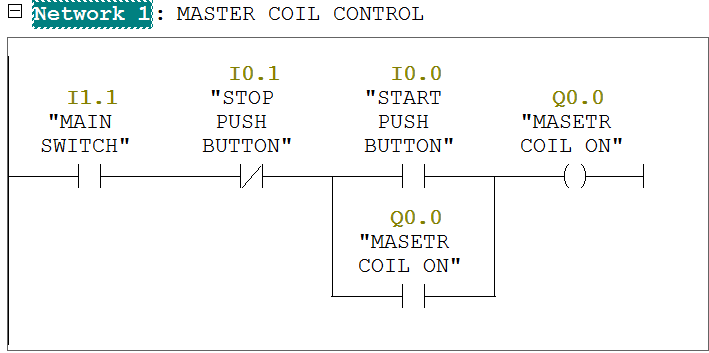
In network 1 we tend to
used latching circuit for master coil ON
(Q0.0) output.it will be
started by pressing START Push button (I0.0) and stop by pressing STOP
pushbutton (I0.1).
When cycle are going to be begin then system check level of the
tank. If tank level is low then then feeding method can begin and tank level is high then
Discharge cycle can begin.
Here we've taken NO contact for each sensors within the program for simplicity. It will be done by relay logic in field otherwise you will choose such variety of sensors.
In network 2,when tank can observe low level then low level sensor (I0.2) is going to be
activated and feeding cycle are going
to be ON. Here we've
taken NC contact of high level sensor
(I0.3) therefore once PLC can observe high
level then it'll STOP feeding
cycle.
In network 3,when tank can observe high level then high
level sensor (I0.3) is to
be activated and discharging cycle are going to be ON. Here we've
taken NC contact of low level sensor (I0.2) therefore once PLC can observe low level then it'll STOP discharge cycle.
In network 4,
mixer motor (Q0.3) will remain ON when discharge valve is ON.
In network 5 when high level (I0.3) is detected, alarm
(Q0.4) will be activated.
In network 6 when acknowledge button is pressed, alarm
will be reset.
Note:-Application is only for learning and
educational purpose .Above application may be different from actual
application. This application can be done in other PLC also. Users are
responsible for correct operation of the PLC system and for any possible
injuries and or material damages resulting from the use of this program. It is
necessary to take care of safety during implementation, installation,
maintenance and operation.
All parameters and
graphical representations considered in this example are for explanation
purpose only, parameters or representation may be different in actual
applications. Also all interlocks are not considered in the application.
January 2, 2025
3 Phase motor control (Forward Reverse) using TIA portal (FBD language).
This is PLC Program for 3 Phase Motor control (Forward/Reverse).
Problem Description
Write the PLC program for 3 phase motor control
(Forward Reverse) in TIA PORTAL using FBD language.
Problem Diagram
Problem Solution
In this case we'd like to
control motor in each direction which will be attainable solely by
forward/Reverse negative feedback circuit or Logic.
Here we tend to solve
this downside by easy Forward/Reverse management Logic.
So here we are going to
take into account one 3 phase motor for Forward and Reverse Operation.
And we can take 2
contactors or relays for control as a result of we'd like 2 totally different
directions here.
Also we must always take
into account 3 push buttons for forward, reverse and stop operate.
So here operator can use
FWD PB for forward operation, REV PB for reverse operation and STOP PB for stop
operate.
Program
Here is PLC program for 3 Phase
Motor control (Forward/Reverse).
List of Inputs/Outputs
Inputs
List:-
FWD PB-I0.0
REV-I0.1
STOP PB-I0.2
Motor
Trip-I0.3
Outputs List:-
Forward motor
contactor-Q0.0
Reverse motor
contactor-Q0.1
FBD diagram for 3 Phase Motor control (Forward/Reverse).
Program Description
In this application we
will use Siemens S7-300 PLC and TIA PORTAL Software for programming. We can
also design this logic with relay circuit.
Network 1:-In this network forward motor contactor (Q0.0) can be start by pressing
FBD PB (I0.0) and can be stopped by pressing STOP PB (I0.2).
Network 2:-In this network reverse motor contactor (Q0.1) can be started by pressing
REV PB(I0.1) and can be stopped by pressing STOP PB (I0.2).
Note:-Application is only for learning purpose .Above
application may be different from actual application. This application can be
done in other PLC also. Users are responsible for correct operation of the PLC
system and for any possible injuries and or material damages resulting from the
use of this program. It is necessary to take care of safety during
implementation, installation, maintenance and operation.
All parameters and
graphical representations considered in this example are for explanation
purpose only, parameters or representation may be different in actual
applications. Also all interlocks are not considered in the application.
December 31, 2024
3 Phase motor control (Forward Reverse) using TIA portal (Ladder language).
This is PLC Program for 3 Phase Motor control (Forward/Reverse).
Problem Description
Write the PLC program for 3 phase motor control
(Forward Reverse) in TIA PORTAL using LAD language.
Problem Diagram
Problem Solution
In this case we'd like to
control motor in each direction which will be attainable solely by
forward/Reverse negative feedback circuit or Logic.
Here we tend to solve
this downside by easy Forward/Reverse management Logic.
So here we are going to
take into account one 3 phase motor for Forward and Reverse Operation.
And we can take 2
contactors or relays for control as a result of we'd like 2 totally different
directions here.
Also we must always take
into account 3 push buttons for forward, reverse and stop operate.
So here operator can use
FWD PB for forward operation, REV PB for reverse operation and STOP PB for stop
operate.
Program
Here is PLC program for 3 Phase
Motor control (Forward/Reverse).
List of Inputs/Outputs
Inputs
List:-
FWD PB-I0.0
REV-I0.1
STOP PB-I0.2
Motor
Trip-I0.3
Outputs List:-
Forward motor
contactor-Q0.0
Reverse motor
contactor-Q0.1
Ladder diagram for 3 Phase Motor control (Forward/Reverse).
Program Description
In this application we
will use Siemens S7-300 PLC and TIA PORTAL Software for programming. We can
also design this logic with relay circuit.
Network 1:-In this network forward motor contactor (Q0.0) can be start by pressing
FBD PB (I0.0) and can be stopped by pressing STOP PB (I0.2).
Network 2:-In this network reverse motor contactor (Q0.1) can be started by pressing
REV PB(I0.1) and can be stopped by pressing STOP PB (I0.2).
Note:-Application is only for learning purpose .Above
application may be different from actual application. This application can be
done in other PLC also. Users are responsible for correct operation of the PLC
system and for any possible injuries and or material damages resulting from the
use of this program. It is necessary to take care of safety during
implementation, installation, maintenance and operation.
All parameters and
graphical representations considered in this example are for explanation
purpose only, parameters or representation may be different in actual
applications. Also all interlocks are not considered in the application.
December 30, 2024
3 Phase motor control (Forward Reverse) using SIMATIC manager (LAD language).
This is PLC Program for 3 Phase Motor control (Forward/Reverse).
Problem Description
Write the PLC program for 3 phase motor control (Forward Reverse) in SIMATIC manager using LAD language.
Problem Diagram
Problem Solution
In this case we'd like to control motor in each direction which will be attainable solely by forward/Reverse negative feedback circuit or Logic.
Here we tend to solve this downside by easy Forward/Reverse management Logic.
So here we are going to take into account one 3 phase motor for Forward and Reverse Operation.
And we can take 2 contactors or relays for control as a result of we'd like 2 totally different directions here.
Also we must always take into account 3 push buttons for forward, reverse and stop operate.
So here operator can use FWD PB for forward operation, REV PB for reverse operation and STOP PB for stop operate.
Program
Here is PLC program for 3 Phase Motor control (Forward/Reverse).
List of Inputs/Outputs
Inputs List:-
FWD PB-I0.0
REV-I0.1
STOP PB-I0.2
Motor Trip-I0.3
Outputs List:-
Forward motor contactor-Q0.0
Reverse motor contactor-Q0.1
LAD diagram for 3 Phase Motor control (Forward/Reverse).

Program Description
In this application we will use Siemens S7-300 PLC and SIMATIC manager Software for programming. We can also design this logic with relay circuit.
Network 1:-In this network forward motor contactor (Q0.0) can be start by pressing FBD PB (I0.0) and can be stopped by pressing STOP PB (I0.2).
Network 2:-In this network reverse motor contactor (Q0.1) can be started by pressing REV PB(I0.1) and can be stopped by pressing STOP PB (I0.2).
Note:-Application is only for learning purpose .Above application may be different from actual application. This application can be done in other PLC also. Users are responsible for correct operation of the PLC system and for any possible injuries and or material damages resulting from the use of this program. It is necessary to take care of safety during implementation, installation, maintenance and operation.
All parameters and graphical representations considered in this example are for explanation purpose only, parameters or representation may be different in actual applications. Also all interlocks are not considered in the application.
December 29, 2024
3 Phase motor control (Forward Reverse) using SIMATIC manager (FBD language).
This is PLC Program for 3 Phase Motor control (Forward/Reverse).
Problem Description
Write the PLC program for 3 phase motor control
(Forward Reverse) in SIMATIC manager using FBD language.
Problem Diagram
Problem Solution
In this case we'd like to
control motor in each direction which will be attainable solely by
forward/Reverse negative feedback circuit or Logic.
Here we tend to solve
this downside by easy Forward/Reverse management Logic.
So here we are going to
take into account one 3 phase motor for Forward and Reverse Operation.
And we can take 2
contactors or relays for control as a result of we'd like 2 totally different
directions here.
Also we must always take
into account 3 push buttons for forward, reverse and stop operate.
So here operator can use
FWD PB for forward operation, REV PB for reverse operation and STOP PB for stop
operate.
Program
Here is PLC program for 3 Phase
Motor control (Forward/Reverse).
List of Inputs/Outputs
Inputs
List:-
FWD PB-I0.0
REV-I0.1
STOP PB-I0.2
Motor
Trip-I0.3
Outputs List:-
Forward motor
contactor-Q0.0
Reverse motor
contactor-Q0.1
FBD diagram for 3 Phase Motor control (Forward/Reverse).
Program Description
In this application we
will use Siemens S7-300 PLC and SIMATIC manager Software for programming. We
can also design this logic with relay circuit.
Network 1:-In this network forward motor contactor (Q0.0) can be start by pressing
FBD PB (I0.0) and can be stopped by pressing STOP PB (I0.2).
Network 2:-In this network reverse motor contactor (Q0.1) can be started by pressing
REV PB(I0.1) and can be stopped by pressing STOP PB (I0.2).
Note:-Application is only for learning purpose .Above application may be different from actual application. This application can be done in other PLC also. Users are responsible for correct operation of the PLC system and for any possible injuries and or material damages resulting from the use of this program. It is necessary to take care of safety during implementation, installation, maintenance and operation.
All parameters and
graphical representations considered in this example are for explanation
purpose only, parameters or representation may be different in actual
applications. Also all interlocks are not considered in the application.
December 28, 2024
PLC Program for Machine Lubrication Control Using S7-300 in LAD
This is PLC Program for Machine Lubrication Control
Problem Description
The goal is to ensure that the lubrication system is activated before the machine starts. The lubrication should only occur when the machine is in the "ready to start" state, and the lubrication process should stop after a predefined period, ensuring that the machine is properly lubricated before operation.
Problem Diagram
Problem Solution
In this example, we aim to solve the problem using simple conditional logic. We have a gearbox motor that requires lubrication before it can be started.
To achieve this, we use a lubrication motor that supplies lubrication oil to the main gearbox motor. We will implement an interlock system to ensure that the operator cannot operate the main motor directly.
Here’s how the system works:
The operator must first start the lubrication motor (pump) before they can operate the main gearbox motor.
This interlock ensures that the gearbox motor is properly lubricated, which helps in maintaining its longevity.
The operator uses dedicated start and stop push buttons for each motor:
- Lubrication Motor (Pump): Start and Stop push buttons.
- Main Gearbox Motor: Separate Start and Stop push buttons.
With this setup, we ensure the gearbox motor receives the necessary lubrication before operation, thus protecting it and extending its operational life.
Program
Here is PLC Program for Machine Lubrication Control.
List of Inputs/Outputs
Inputs List: -
Cycle Start PB: -I0.0
Cycle stop PB: -I0.1
Oil Pump Start PB-I0.3
Oil Pump Stop PB-I0.2
Main Motor Start PB-I0.5
Main Motor Stop PB-I0.4
Outputs List:-
Master coil:-Q0.0
Oil Pump Motor-Q0.1
Main Motor-Q0.2
Function block diagram to provide lube for the machine.
Program Description
In the first and second networks, we use a set-reset circuit. The master coil can be started by pressing the Cycle Start PB and stopped by pressing the Cycle Stop PB.
In network 3, the oil pump can be started by pressing the Oil Pump Start PB and stopped by pressing the Oil Pump Stop PB.
In network 4, the main motor can be started by pressing the Main Motor Start PB and stopped by pressing the Main Motor Stop PB.
Note: -Application is only for learning purpose .Above application may be different from actual application. This application can be done in other PLC also. Users are responsible for correct operation of the PLC system and for any possible injuries and or material damages resulting from the use of this program. It is necessary to take care of safety during implementation, installation, maintenance and operation.
All parameters and graphical representations considered in this example are for explanation purpose only, parameters or representation might be different in actual applications. Also all interlocks are not considered in the application.