February 23, 2025

Automatic heating and mixing process of two materials (S7-300 FBD).

Automatic heating and mixing process of two materials (S7-300 FBD).

This is PLC Program for automatic heating and mixing process of two materials.

Problem Description


Two material are collected in a tank and mixed till it achieves set temperature. Make ladder diagram logic for this automatic process.


https://plcscadaacademy.blogspot.com/


Problem Solution

This logic can be implemented using a simple PLC ladder diagram.

System Description:

  • Level Detection:
    Use two separate level switches to detect the level of two different materials (Material 1 and Material 2) inside the mixing tank.
    Additionally, one empty level switch is used to detect when the tank is empty.

  • Filling Mechanism:
    A single-acting valve (either fully open or fully closed) is used to control the inflow of materials into the tank.

  • Mixing Mechanism:
    A mixer is installed inside the tank, connected to a motor shaft, to ensure proper mixing of the materials.

  • Heating Mechanism:
    A heater and a temperature sensor are installed to monitor and control the temperature of the mixture.

Control Logic Overview:

  1. When the tank is empty (as detected by the empty level switch), open the valve to start filling Material 1 and Material 2 based on their respective level switches.

  2. Once both materials reach their required levels, close the inlet valve.

  3. Start the mixer motor to begin mixing the materials.

  4. Simultaneously, turn on the heater and monitor the temperature using the temperature sensor.

  5. Continue mixing and heating until the mixture reaches the desired set temperature.

  6. Once the temperature is reached:

    • Stop the mixer and heater.

    • Open the discharge valve (Q0.4) to empty the tank.

  7. After the tank is emptied, the process can restart based on the empty level switch detection.


Program

Here is PLC program for automatic heating and mixing process of two materials.


List of Inputs/Outputs

Inputs List:-

Cycle START button:-I0.0

Cycle STOP button:-I0.1

Level of material 2:-I0.2

Level of material 1:-I0.3

Empty level SW:-I0.4

Temp sensor:-I0.5


Outputs List:-

Material 1 valve:-Q0.0

Material 2 valve:-Q0.1

Agitator motor:-Q0.2

Heater:-Q0.3

Discharge valve:-Q0.4


M Memory:-

M0.0=Master coil.


FBD diagram for automatic heating and mixing process of two materials.


https://plcscadaacademy.blogspot.com/


https://plcscadaacademy.blogspot.com/


https://plcscadaacademy.blogspot.com/


https://plcscadaacademy.blogspot.com/


Program Description

This example illustrates a simple control process divided into five logical networks. The process demonstrates a basic sequence for material filling, mixing, and discharge, using input/output devices. This application is intended for educational and learning purposes only.

🔹 Network 1:Cycle Start/Stop Control (Latching Circuit)

  • A latching circuit is used to control the cycle operation.

  • The cycle starts when the Cycle START push button (I0.0) is pressed.

  • The cycle stops when the Cycle STOP push button (I0.1) is pressed.

🔹 Network 2: Material 1 Valve Control

  • The Material 1 valve (Q0.0) is turned ON under either of the following conditions:

  • The Cycle START button (I0.0) is pressed.

  • The Empty Level Switch (I0.4) is activated.

🔹 Network 3: Material 2 Valve Control

  • When the level of Material 1 is detected (I0.3), the Material 2 valve (Q0.1) is turned ON to begin the second stage of filling.

🔹 Network 4: Heater and Agitator Motor Control

  • Once the level of the combined materials is detected by Level Sensor (I0.5):

  • The Agitator Motor (Q0.2) is also turned ON to begin the mixing process.

  • The Heater (Q0.3) is turned ON.

🔹 Network 5: Discharge Valve Control

  • When the Temperature Sensor (I0.5) indicates the required condition is met, the Discharge Valve (Q0.4) is turned ON to release the processed material.

Disclaimer

  • This application is designed only for educational and demonstration purposes. It may differ from real-world applications in functionality and safety requirements.

  • All parameters and graphical representations used in this example are illustrative only and may vary in practical scenarios.

  • Critical interlocks and safety measures are not included in this simplified example.

  • Users must ensure proper implementation, installation, and maintenance, and are fully responsible for the safe operation of any PLC system derived from this concept.

  • Always follow safety standards and consult appropriate guidelines during actual deployment.

February 22, 2025

Count products passing on the conveyor using counter instruction in FBD language in Simatic Manager

Count products passing on the conveyor using counter instruction (S7-300 FBD).


This is PLC Program for counting products passing on the conveyor using counter instruction.


Problem Description

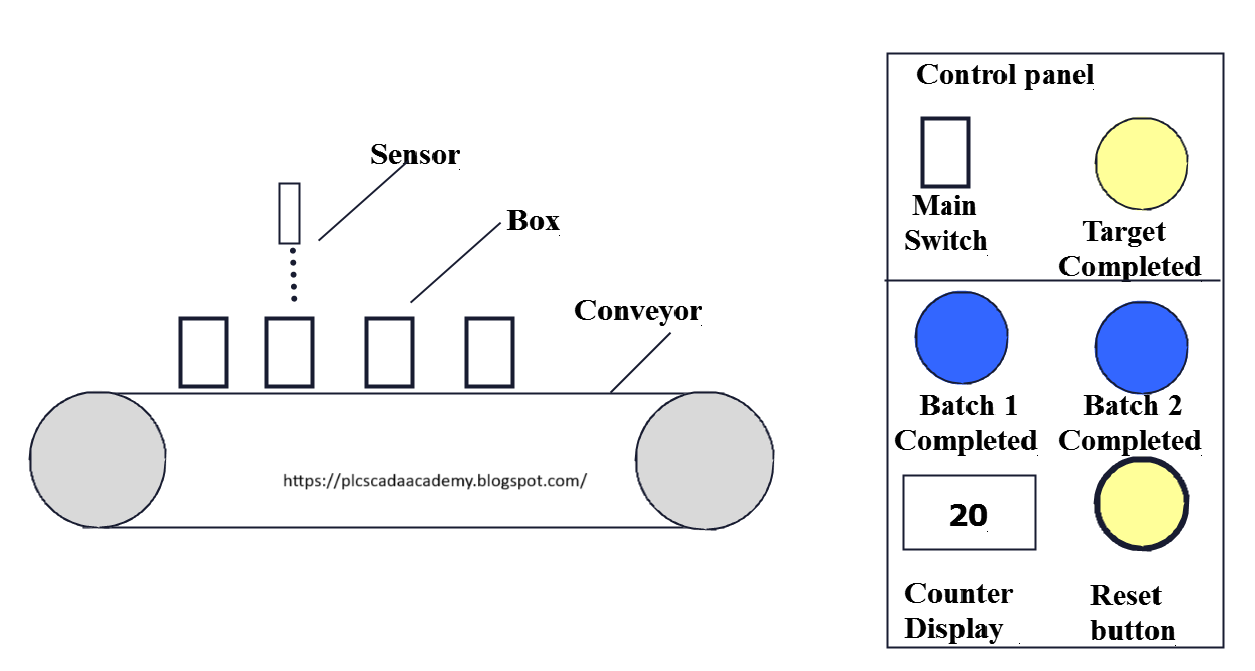
On the conveyor boxes are passing, we need to count boxes passing on the conveyor. Write PLC program for this application using FBD diagram language.


Problem Diagram


Problem Solution

For this example we will use PLC programming and counter instruction.

Sensor is used to detect the boxes passing on the conveyor and show the count value on the display.

Here we considered two batches so when it will be completed indication lamp will glow.

Once production target is completed, total counter value can be reset by the reset button.


Program

Here is PLC program for counting products passing on the conveyor using counter instruction.

List of Inputs/Outputs

Inputs List:-

Box detector=I0.0

Reset button= I0.1

Main SW=I0.2

Outputs List:-

Target competed indication:- Q0.0

Batch 1 completed indication:-Q0.1

Batch 2 completed indication:-Q0.2


FBD diagram for counting products passing on the conveyor using counter instruction.


https://plcscadaacademy.blogspot.com


https://plcscadaacademy.blogspot.com


https://plcscadaacademy.blogspot.com


Program Description


In network 1 we've used on Main SW (I0.2) to START out the system and that we used NO contact of box detector (I0.0) nonparallel. Here we tend to thought-about one UP counter thus once box detector (I0.0) detects box then counter can count.

Here additionally we've taken target completed indication lamp (Q0.0) for target completion indication.


By pressing RESET BUTTON (I0.1) user will RESET the previous production record.

Counter operation boost count the boxes and RESET BUTTON (I0.1) for reset the assembly record. And preset value (PV) is 40 products and Counter value (CV) is MW10 for storage actual boxes on the conveyor detected by the sensor.

In network 2 we tend to took batch1 logic. Here we tend to used comparator for counting 20 boxes for batch 1 and once it'll be completed then batch 1 completed indication lamp (Q0.1) will ON.


In network 3 we tend to took batch 2 logic. Here we tend to used comparator for investigating 20 boxes for batch 1 and once it'll be completed then batch 2 competed indication lamp (Q0.2) will ON.


Note:-Application is only for learning and educational purpose .Above application may be different from actual application. This application can be done in other PLC also. Users are responsible for correct operation of the PLC system and for any possible injuries and or material damages resulting from the use of this program. It is necessary to take care of safety during implementation, installation, maintenance and operation.


All parameters and graphical representations considered in this example are for explanation purpose only, parameters or representation may be different in actual applications. Also all interlocks are not considered in the application.


February 21, 2025

Count products passing on the conveyor using counter instruction in ladder using Simatic manager

Count products passing on the conveyor using counter instruction (S7-300 LAD).


This is PLC Program for counting products passing on the conveyor using counter instruction.


Problem Description

On the conveyor boxes are passing, we need to count boxes passing on the conveyor. Write PLC program for this application using ladder diagram language.


Problem Diagram


Problem Solution

For this example we will use PLC programming and counter instruction.

Sensor is used to detect the boxes passing on the conveyor and show the count value on the display.

Here we considered two batches so when it will be completed indication lamp will glow.

Once production target is completed, total counter value can be reset by the reset button.


Program

Here is PLC program for counting products passing on the conveyor using counter instruction.

List of Inputs/Outputs

Inputs List:-

Box detector=I0.0

Reset button= I0.1

Main SW=I0.2

Outputs List:-

Target competed indication: - Q0.0

Batch 1 completed indication: - Q0.1

Batch 2 completed indication: - Q0.2


Ladder diagram for counting products passing on the conveyor using counter instruction.


https://plcscadaacademy.blogspot.com


https://plcscadaacademy.blogspot.com


https://plcscadaacademy.blogspot.com


https://plcscadaacademy.blogspot.com

Program Description


In network 1 we've used on Main SW (I0.2) to START out the system and that we used NO contact of box detector (I0.0) nonparallel. Here we tend to thought-about one UP counter thus once box detector (I0.0) detects box then counter can count.

Here additionally we've taken target completed indication lamp (Q0.0) for target completion indication.


By pressing RESET BUTTON (I0.1) user will RESET the previous production record.

Counter operation boost count the boxes and RESET BUTTON (I0.1) for reset the assembly record. And preset value (PV) is 40 products and Counter value (CV) is MW10 for storage actual boxes on the conveyor detected by the sensor.

In network 2 we tend to took batch1 logic. Here we tend to used comparator for counting 20 boxes for batch 1 and once it'll be completed then batch 1 completed indication lamp (Q0.1) will ON.


In network 3 we tend to took batch 2 logic. Here we tend to used comparator for investigating 20 boxes for batch 1.and once it'll be completed then batch 2 competed indication lamp (Q0.2) will ON.

Note:-Application is only for learning and educational purpose .Above application may be different from actual application. This application can be done in other PLC also. Users are responsible for correct operation of the PLC system and for any possible injuries and or material damages resulting from the use of this program. It is necessary to take care of safety during implementation, installation, maintenance and operation.


All parameters and graphical representations considered in this example are for explanation purpose only, parameters or representation may be different in actual applications. Also all interlocks are not considered in the application.

February 20, 2025

Count products passing on the conveyor using counter instruction in FBD language

 Count products passing on the conveyor using counter instruction (S7-1200 FBD).


This is PLC Program for counting products passing on the conveyor using counter instruction.


Problem Description

On the conveyor boxes are passing, we need to count boxes passing on the conveyor. Write PLC program for this application using FBD diagram language.


Problem Diagram


Problem Solution

For this example we will use PLC programming and counter instruction.

Sensor is used to detect the boxes passing on the conveyor and show the count value on the display.

Here we considered two batches so when it will be completed indication lamp will glow.

Once production target is completed, total counter value can be reset by the reset button.


Program

Here is PLC program for counting products passing on the conveyor using counter instruction.

List of Inputs/Outputs

Inputs List:-

Box detector=I0.0

Reset button= I0.1

Main SW=I0.2

Outputs List:-

Target competed indication:- Q0.0

Batch 1 completed indication:-Q0.1

Batch 2 completed indication:-Q0.2


FBD diagram for counting products passing on the conveyor using counter instruction.


Program Description


In network 1 we've used on Main SW (I0.2) to START out the system and that we used NO contact of box detector (I0.0) nonparallel. Here we tend to thought-about one UP counter thus once box detector (I0.0) detects box then counter can count.

Here additionally we've taken target completed indication lamp (Q0.0) for target completion indication.


By pressing RESET BUTTON (I0.1) user will RESET the previous production record.

Counter operation boost count the boxes and RESET BUTTON (I0.1) for reset the assembly record. And preset value (PV) is 40 products and Counter value (CV) is MW10 for storage actual boxes on the conveyor detected by the sensor.

In network 2 we tend to took batch1 logic. Here we tend to used comparator for counting 20 boxes for batch 1 and once it'll be completed then batch 1 completed indication lamp (Q0.1) will ON.


In network 3 we tend to took batch 2 logic. Here we tend to used comparator for investigating 20 boxes for batch 1 and once it'll be completed then batch 2 competed indication lamp (Q0.2) will ON.


Note:-Application is only for learning and educational purpose .Above application may be different from actual application. This application can be done in other PLC also. Users are responsible for correct operation of the PLC system and for any possible injuries and or material damages resulting from the use of this program. It is necessary to take care of safety during implementation, installation, maintenance and operation.


All parameters and graphical representations considered in this example are for explanation purpose only, parameters or representation may be different in actual applications. Also all interlocks are not considered in the application.


February 19, 2025

Count products passing on the conveyor using counter instruction in ladder logic

Count products passing on the conveyor using counter instruction.


This is PLC Program for counting products passing on the conveyor using counter instruction.


Problem Description

On the conveyor boxes are passing, we need to count boxes passing on the conveyor. Write PLC program for this application using ladder diagram language.


Problem Diagram


Problem Solution

For this example we will use PLC programming and counter instruction.

Sensor is used to detect the boxes passing on the conveyor and show the count value on the display.

Here we considered two batches so when it will be completed indication lamp will glow.

Once production target is completed, total counter value can be reset by the reset button.


Program

Here is PLC program for counting products passing on the conveyor using counter instruction.

List of Inputs/Outputs

Inputs List:-

Box detector=I0.0

Reset button= I0.1

Main SW=I0.2

Outputs List:-

Target competed indication: - Q0.0

Batch 1 completed indication: - Q0.1

Batch 2 completed indication: - Q0.2


Ladder diagram for counting products passing on the conveyor using counter instruction.


Program Description


In network 1 we've used on Main SW (I0.2) to START out the system and that we used NO contact of box detector (I0.0) nonparallel. Here we tend to thought-about one UP counter thus once box detector (I0.0) detects box then counter can count.

Here additionally we've taken target completed indication lamp (Q0.0) for target completion indication.


By pressing RESET BUTTON (I0.1) user will RESET the previous production record.

Counter operation boost count the boxes and RESET BUTTON (I0.1) for reset the assembly record. And preset value (PV) is 40 products and Counter value (CV) is MW10 for storage actual boxes on the conveyor detected by the sensor.

In network 2 we tend to took batch1 logic. Here we tend to used comparator for counting 20 boxes for batch 1 and once it'll be completed then batch 1 completed indication lamp (Q0.1) will ON.


In network 3 we tend to took batch 2 logic. Here we tend to used comparator for investigating 20 boxes for batch 1.and once it'll be completed then batch 2 competed indication lamp (Q0.2) will ON.

Note:-Application is only for learning and educational purpose .Above application may be different from actual application. This application can be done in other PLC also. Users are responsible for correct operation of the PLC system and for any possible injuries and or material damages resulting from the use of this program. It is necessary to take care of safety during implementation, installation, maintenance and operation.


All parameters and graphical representations considered in this example are for explanation purpose only, parameters or representation may be different in actual applications. Also all interlocks are not considered in the application.


February 16, 2025

Develop a program in FBD Logic in SIMATIC Manager for an automatic material mixing system using a PLC.

Automatic material mixing system using PLC (S7-300 FBD).


This is PLC Program for automatic material mixing system using PLC.


Problem Description:-

We need to mix two material (material 1 and material 2). Provide separate switch for each material. And also provide facility for mixed material for the same. Write FBD diagram logic for the application.

Problem Diagram:-


Problem Solution
For explanation we are able to think about straight forward example of mixing system. During this application pure unmixed material is ready by the action of SW S1 and S2.And mixed material is ready by the action of SW3.

Operator watches the extent of the tank and he will discharge tank by the discharge valve and we keep the mixer motor ON whereas tank is being filled. We are going to give interlock system thus user cannot operate each switch at same time.

Program

Here is PLC program for Automatic material mixing system using PLC.

List of inputs

SW 1:-I0.0

SW 2:-I0.1

SW 3:-I0.2

Mixer trip:-I0.3

List of outputs

Material valve 1:-Q0.0

Material valve 2:-Q0.1

Discharge valve:-Q0.2


 FBD diagram for the automatic material mixing system using PLC


Program Description

In network 1 we used NO contact of SW1 (I0.0) and NC contact of SW2 (I0.1) and NC contact of SW3 (I0.2) in series. By activating SW1 operator can START the valve for material 1

In network 2 we have taken NO contact of SW2 (I0.1) and NC contact of SW1 (I0.0) and SW3 (I0.2) in series. By activating SW2 (I0.1) operator can START the valve for material 2.

In network 3 mixer motor will START when one of the valve is running out of two valves. If there is some fault in motor then motor will not start.


Note:-Application is only for learning and educational purpose .Above application may be different from actual application. This application can be done in other PLC also. Users are responsible for correct operation of the PLC system and for any possible injuries and or material damages resulting from the use of this program. It is necessary to take care of safety during implementation, installation, maintenance and operation.

 All parameters and graphical representations considered in this example are for explanation purpose only, parameters or representation may be different in actual applications. Also all interlocks are not considered in the application.