October 3, 2019

Modbus Communication between PLC and Energy meter


Learn how to configure and write PLC programs for Modbus communication between PLC and Energy meter.


Click here for more detail
 https://instrumentationtools.com/modbus-communication-between-plc-and-energy-meter/

Learn how to configure micro PLC hardware

Learn how to write the PLC program for micro PLC hardware configuration using software.


Click on image for more detail
 https://instrumentationtools.com/micro-plc-hardware-configuration/

September 14, 2019

Slot rules Siemens S7-300

Rack 0:
  • Slot 1: Power supply only (for example, 6ES7 307-...) or empty
  • Slot 2: CPU only (for example, 6ES7 314-...)
  • Slot 3: Interface module (for example, 6ES7 360-.../361-...) or empty
  • Slots 4 through 11: Signal or function modules, communications processors, or free.
Racks 1 to 3:

  • Slot 1: Power supply module only (for example, 6ES7 307-...) or empty
  • Slot 2: Free
  • Slot 3: Interface module
  • Slots 4 through 11: Signal or function modules, communications processors (dependent on the inserted interface module), or free.

May 3, 2019

DeMorgan’s Theorems

DeMorgan’s Theorems. Write the PLC program for DeMorgan’s Theorems using ladder language.


Click on image for more detail
https://instrumentationtools.com/demorgans-theorems-using-ladder-diagram/

Lows of boolean algebra


Lows of Boolean algebra. Explain Boolean algebra using ladder language.


Click on image for more detail


https://instrumentationtools.com/laws-of-boolean-algebra-ladder-logic/


April 20, 2019

Read temperature in the PLC


Analog scaling in S7-300 PLC

Analog scaling learning in PLC.Learn how to write PLC program for analog scaling.Learn how analog scaling is used in the PLC.


Click here for more detail
https://instrumentationtools.com/plc-program-for-control-valve-scaling/

PLC timer instruction


PLC timer used in PLC. Learn how to write timer instruction in the PLC.


Click on image for more detial
https://instrumentationtools.com/plc-program-for-iec-timers-ton-tof-tp-tonr-used-in-s7-1200/

March 19, 2019

Auto/Manual Operation of Roll down Shutters in industry

PLC based Auto/Manual Operation of Roll down Shutters in Industry. Learn PLC programming of this application using auto and manual mode.


Click on image for more detail
https://instrumentationtools.com/plc-based-auto-manual-operation-roll-down-shutters/

March 18, 2019

Portal view in TIA portal software.


Portal view in TIA portal software.


Problem Description:-
Explain Portal view in TIA portal software.


Diagram:-


Description:-
The TIA portal can manage all data in the project in single platform. There are two views in the software which can be change any time.

Two views of the TIA portal are 1) Portal view and 2) Project view.

Portal view:-

Task oriented and fast project starting facilities.

Project view:-

Hierarchical structure, all parameters and data available in single view.

In this view user can do following configuration,

Configure devices
Create project
PLC programming
Project migration
Change user interface language
Open project
Change the view of the software.


Note:-All explanation, representation are for learning purpose.

February 8, 2019

Run time advanced configuration in TIA portal


Run time advanced configuration in TIA portal

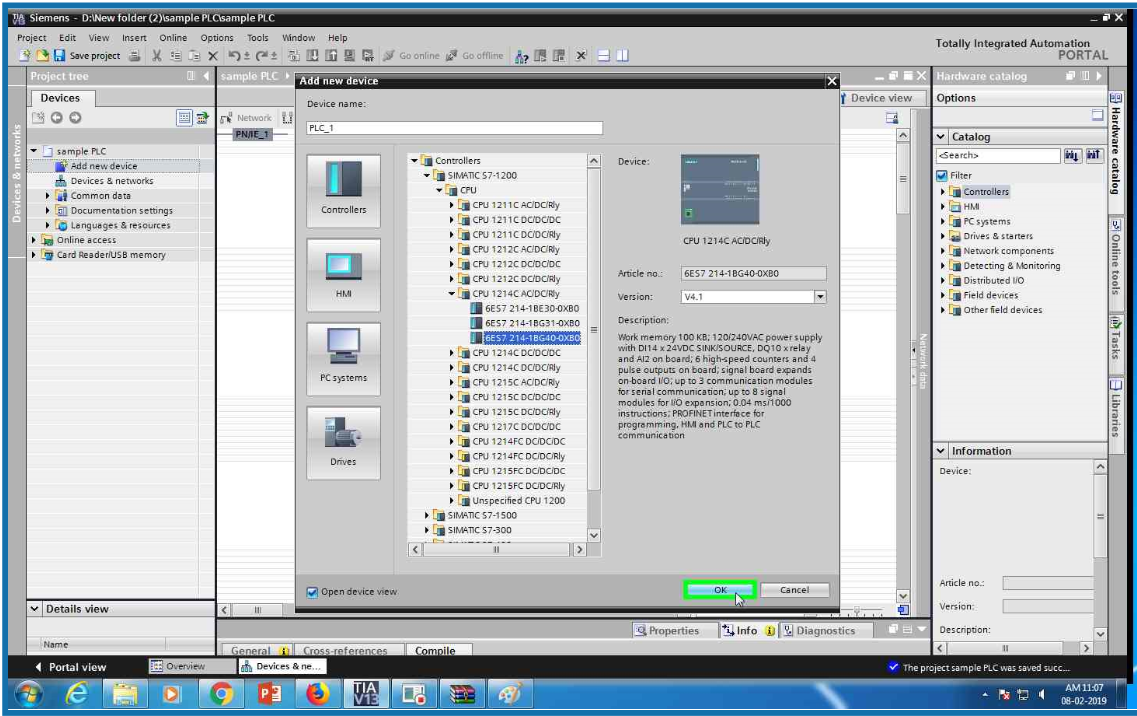
Open TIA portal and click on add new device


Select controller family from the list


Select CPU form the S7-1200 family


From the list select CPU 1214 AC/DC/RLY PLC


Select serial no 6ES7 214-1BG40-0XB0 from the list (this is for example only you ca select CPU which you have).


Click OK and done! PLC configuration.


Again add new device and open PC system family from the list


Select PC general from the list


Select PC station


Click OK


Add IE general from the hardware catalog.


Add it


Now add Wincc RT advanced from the catalog.


Select network view and check both IP address


Set the connection between two devices.Now RT advanced configuration completed.


Run time advanced configuration in TIA portal


Run time advanced configuration in TIA portal

Open TIA portal and click on add new device


Select controller family from the list


Select CPU form the S7-1200 family


From the list select CPU 1214 AC/DC/RLY PLC


Select serial no 6ES7 214-1BG40-0XB0 from the list (this is for example only you ca select CPU which you have).


Click OK and done! PLC configuration.


Again add new device and open PC system family from the list


Select PC general from the list


Select PC station


Click OK


Add IE general from the hardware catalog.


Add it


Now add Wincc RT advanced from the catalog.


Select network view and check both IP address


Set the connection between two devices.Now RT advanced configuration completed.