March 21, 2026

The Core Architecture of a Distributed Control System (DCS)

In industrial automation, a Distributed Control System (DCS) is the brain of large-scale processing plants. Unlike a standalone PLC system, a DCS is designed for high availability, complex regulatory control, and seamless integration of thousands of I/O points.

To understand how a DCS functions, one must look at its three primary functional pillars: the Engineering Station (ES), the Operating Station (OS), and the Automation Station (AS).

The Engineering Station (ES): The Architect’s Workspace

The Engineering Station is the centralized environment where the entire control strategy is designed, configured, and managed. It is the development side of the DCS.

Key Functions of the ES:

Hardware Configuration: Defining the physical layout of the system, including racks, power supplies, communication modules, and I/O cards.

Logic Programming: Using standardized languages (like Function Block Diagrams (FBD) or Sequential Function Charts (SFC)) to create the control loops that govern the plant.

HMI Design: Creating the graphical interfaces (mimics) that operators will eventually use to monitor the process.

Database Management: Maintaining the Global Data of the plant, ensuring that every tag (e.g., a temperature sensor) has a unique name and address recognizable by all other components.

Download Management: Once the logic is verified, the ES is used to download or deploy the code to the Automation Stations and the graphics to the Operating Stations.

Crucial Note: The ES is usually not needed for the plant to run day-to-day. Once the logic is downloaded to the controllers, the ES can be turned off without affecting the process. It is only needed for modifications, backups, or troubleshooting.


The Operating Station (OS): The Operator’s Window

The Operating Station is the interface between the human and the machine. It provides the real-time visualization required to run the plant safely and efficiently.

Key Functions of the OS:

Process Visualization: Displaying live data through graphical mimics. Operators use these to see tank levels, valve positions, and motor statuses.

Alarm Management: Notifying operators of deviations (e.g., High Pressure in Boiler 1). The OS categorizes these by priority to prevent alarm fatigue.

Trend Analysis: Logging historical data so operators can view graphs of how a process variable has changed over the last hour, day, or month.

Command Execution: Allowing operators to manually open valves, start pumps, or change setpoints (e.g., increasing a target temperature from 80°C to 90°C).

OS Server vs. OS Client:

In large systems, the OS is split into two parts:

OS Server: Communicates directly with the controllers to gather data and manage the central database/archives.

OS Client: A station with no direct connection to the controllers; it simply retrieves information from the Server to show the operator.


The Automation Station (AS): The Engine Room

The Automation Station (often called the Controller) is the workhorse  of the DCS. This is the hardware that physically interacts with the field instruments.

Key Functions of the AS:

Real-Time Execution: The AS runs the control logic (PID loops, interlocks, and calculations) at very high speeds (typically in millisecond cycles).

I/O Processing: It reads electrical signals from sensors (4–20 mA, digital pulses) and sends electrical signals to actuators (valves, motors).

Autonomous Operation: The AS is designed to be completely independent. If the OS or ES fails, the AS continues to run its logic, ensuring the plant remains in a safe state.

Redundancy: In a DCS, Automation Stations are almost always redundant. There is a  Master  and a Standby  controller. If the Master fails, the Standby takes over in milliseconds without any process interruption (Burpless Transfer).


Summary Comparison: ES vs. OS vs. AS

Feature

Engineering Station (ES)

Operating Station (OS)

Automation Station (AS)

Primary Goal

Configuration & Programming

Monitoring & Control

Execution & Hardware Interface

User

Engineers / Programmers

Plant Operators

(Autonomous Hardware)

Software

Configuration Tools (e.g., HW Config, CFC)

Runtime HMI Software

Firmware & Control Logic

Impact of Failure

No immediate impact on process

Loss of visibility (Blindness)

Total process shutdown (unless redundant)

Location

Control Room / Office

Control Room

Electrical/Marshalling Room


The Communication Network

For these three components to work together, they rely on two distinct levels of industrial networks:

Terminal Bus: Connects the ES and the OS. This is typically high-speed Ethernet and carries management data (graphics, alarms, logs).

Plant Bus: Connects the OS and the AS. This is a mission-critical network (often using Industrial Ethernet or Profibus) that carries the real-time process data.

Why the Distinction Matters

This modularity is what gives a DCS its power. By separating the logic (AS) from the visuals (OS) and the configuration (ES), companies can ensure that a software glitch on a computer screen (OS) never causes a physical explosion or process trip in the plant (AS).


DCS Automation Station (AS) Hardware Comparison

In a Distributed Control System, the Automation Station (AS) is the controller responsible for executing logic and managing I/O. Below is a detailed technical comparison of the flagship controllers used in three of the industry's leading DCS platforms: Siemens SIMATIC PCS 7 (AS 410-5H), ABB Ability™ System 800xA (AC 800M), and Emerson DeltaV™ (PK Controller).


Feature

Siemens SIMATIC PCS 7

ABB System 800xA

Emerson Delta

Primary Controller

AS 410-5H

AC 800M (PM891)

PK Controller

CPU Architecture

Specialized High-Performance Firmware

RISC-based (PowerPC)

ARM-based Microprocessor

Memory Capacity

Up to 48 MB (Scalable via System Expansion Card)

256 MB SDRAM

128 MB (User Configurable)

Redundancy Type

Hardware-based Sync Module (Hot Standby)

Software-based Redundancy (Hot Standby)

Native Parallel Redundancy (Hot Standby)

Execution Speed

Min. scan cycle: 10ms

Min. scan cycle: 1ms

Min. scan cycle: 25ms

Max I/O Capacity

~4,000 to 6,000 I/O per station

~1,000 to 1,500 I/O per station

~1,500 I/O per station

Native Protocols

PROFINET, PROFIBUS DP/PA

EtherNet/IP, PROFINET, Modbus TCP, MMS

Ethernet/IP, Modbus TCP, PROFINET, OPC UA

Programming Standards

IEC 61131-3 (CFC, SFC, SCL)

IEC 61131-3 (ST, FBD, SFC, LD)

IEC 61131-3 (Function Block, SFC)

Hazardous Area Rating

ATEX/IECEx Zone 2

ATEX/IECEx Zone 2

Class 1 Div 2 / Zone 2

I/O Integration

ET 200SP HA / ET 200M

S800 I/O, S900 I/O

CHARMs (Characterization Modules)

Operating Temperature

0°C to +60°C

0°C to +55°C

-40°C to +70°C


Key Technical Differentiators

Siemens PCS 7: The All-In-One Scalability

The AS 410-5H is unique because it uses a System Expansion Card (SEC). Instead of buying different hardware for small vs. large plants, you buy one physical controller and unlock its processing power (PO - Process Objects) via firmware licenses. It’s hardware-based synchronization makes it the gold standard for high-speed, fail-safe applications.


ABB 800xA: The Integration Specialist

The AC 800M is known for its incredible flexibility in protocol handling. It acts as a powerful data concentrator, often used when a plant needs to integrate a massive variety of third-party PLC data into a single DCS environment. It excels in complex logic involving multiple IEC 61131-3 languages simultaneously.

Emerson DeltaV: The Electronic Marshalling  Leader

The PK Controller and the use of CHARMs revolutionized DCS hardware. CHARMs allow any I/O type (AI, AO, DI, DO) to be landed on any terminal, with the characterization  happening in software. This eliminates the need for complex cross-wiring (marshalling) and makes Emerson the leader in project execution speed and  late-stage  design changes.


DCS Hardware Selection Logic

Choose Siemens if your plant requires seamless integration with Siemens motor starters/drives and high-speed safety (SIS) integration using the same controller hardware.

Choose ABB if you have a highly fragmented plant with many different legacy protocols and need a  system of systems  to unify them.

Choose Emerson if you want to minimize footprint, reduce field wiring costs, and require a rugged controller that can be mounted in the field without specialized cooling.

High-Availability Architectures: Redundancy Concepts in Distributed Control Systems (DCS)

In the world of industrial automation—where a single second of downtime in a petrochemical refinery or a power grid can result in millions of dollars in losses or catastrophic safety failures—Redundancy is not a luxury; it is a foundational requirement.

A Distributed Control System (DCS) is engineered for  high availability,  often targeting 99.999% uptime (the  five nines ). Achieving this level of reliability requires a sophisticated approach to hardware and software redundancy, specifically regarding how backup systems take over when a primary component fails.

This article explores the core philosophies of redundancy, focusing on the technical distinctions between Cold, Warm, and Hot Standby systems.


The Philosophy of Redundancy

Redundancy is the duplication of critical components or functions of a system with the intention of increasing reliability. In a DCS, redundancy is applied at multiple levels:

Network Redundancy: Dual Ethernet cables and switches (e.g., PRP or HSR protocols).

Power Redundancy: Dual power supply modules fed from independent UPS sources.

Controller Redundancy: Duplicate processing units (Automation Stations) that execute the control logic.

The  Standby  terminology refers to how the secondary (backup) unit behaves while the primary unit is healthy.


Cold Standby: The Manual Intervention

Cold Standby is the most basic form of redundancy. In this configuration, the secondary system is typically powered off or disconnected from the live process.

Technical Characteristics:

State: The backup unit is inactive. It does not have the current process values, alarm states, or timers in its memory.

Switchover: Manual or semi-automatic. If the primary fails, an engineer must typically power up the secondary, load the latest configuration/software, and then command it to take control.

Recovery Time: Minutes to hours. This is known as  Maximum Tolerable Downtime  (MTD).

Use Case:

Cold standby is rarely used for critical control loops. It is more common for Engineering Stations (ES) or non-critical peripheral servers where the process can safely remain in a  steady state  for a short duration while the hardware is swapped.


 Warm Standby: The Prepared Backup

Warm Standby bridges the gap between cost-efficiency and system availability. In a warm standby setup, the secondary unit is powered on and running, but it is not actively controlling the process or fully synchronized with the primary's real-time data.

Technical Characteristics:

State: The backup unit is energized and has the control software loaded. However, it may only receive periodic updates from the primary (e.g., every few seconds or minutes).

Data Consistency: There is a  data gap.  If the primary fails, the warm standby might


March 20, 2026

Sequential Motor Control with Time delay using Schneider M340 PLC

Introduction

Sequential motor control with time delay is a widely used industrial automation technique where multiple motors are operated one after another in a fixed sequence, with a programmed delay between each operation. Instead of starting all motors simultaneously, which can cause excessive current surges and mechanical stress, this method ensures safe operation, load management, and smooth functioning of machines.

The system is typically implemented using a Programmable Logic Controller (PLC), which provides flexibility, reliability, and easy modification of timing or sequence. Timers within the PLC are used to introduce delays between the starting of each motor, ensuring controlled and predictable operation.

This technique is essential in industries where multiple motors are part of a process, such as conveyor systems, pumping stations, HVAC systems, and automated manufacturing plants.

     Diagram: -


Problem Statement

In industrial environments, starting multiple motors simultaneously can lead to:

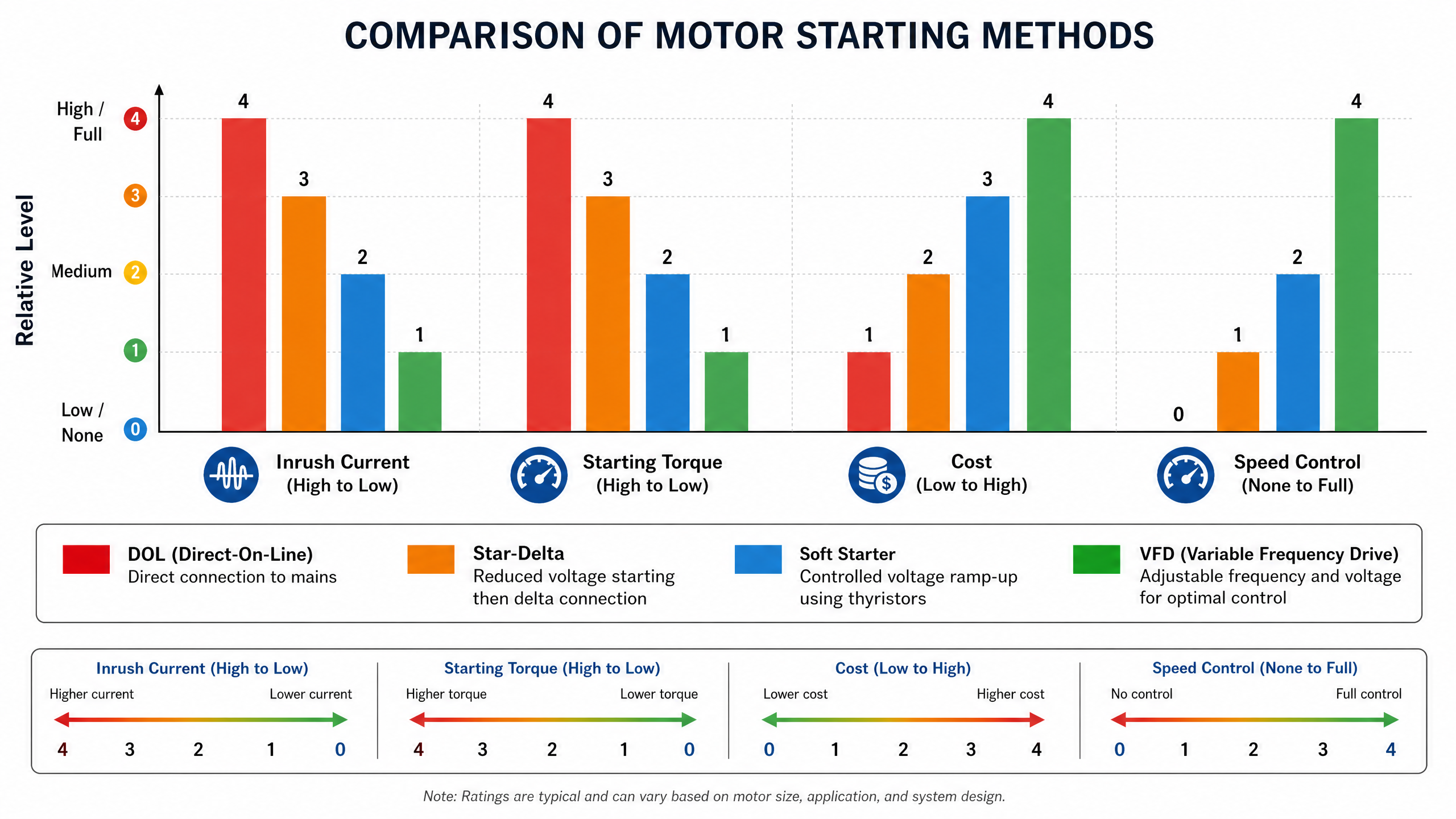
High inrush current, causing voltage dips and possible equipment damage.

Mechanical stress on connected machinery.

Reduced safety due to uncontrolled startup.

To overcome these issues, a sequential motor control system with time delay is required. This system ensures motors start one after another, with defined delays, improving safety, efficiency, and equipment lifespan.


Components Used

Start Push Button (NO – Normally Open): Initiates the process.

Stop Push Button (NC – Normally Closed): Stops the system instantly.

Relay Coil: Provides latching after pressing the start button.

Motors (M1, M2, M3, M4, M5): Represent different stages of operation.

Timers (TON_1, TON_2, TON_3, TON_5): Provide time delays between motor operations.


Ladder Logic Concept

The PLC program is designed using ladder logic. The Start button energizes the relay coil, which latches the system. Timers are then activated sequentially, each controlling the delay before the next motor starts. The Stop button breaks the latch, shutting down all motors immediately.


Working Principle

Step 1: System Start

When the Start button is pressed, the relay coil energizes and latches itself using its own contact.

The system remains ON even after releasing the Start button.

Pressing the Stop button breaks the latch, stopping all motors instantly.

Step 2: First Motor (M1) Operation

After the relay is activated, Motor M1 starts immediately.

No delay is applied before M1, making it the starting point of the sequence.


Step 3: Second Motor (M2) with Delay

Timer TON_1 is activated with a preset delay of 30 seconds.

After this delay, its output turns ON Motor M2.

M2 starts 30 seconds after M1.


Step 4: Third Motor (M3) with Additional Delay

Timer TON_2 is used for Motor M3, with a delay of 40 seconds.

Once the timer completes, M3 is turned ON.

M3 starts after M2 with a defined delay.


Step 5: Fourth Motor (M4)

Timer TON_5 controls Motor M4 with a delay of 50 seconds.

After the timer finishes, M4 starts automatically.

This ensures proper sequencing and avoids overload.


Step 6: Fifth Motor (M5)

Finally, Timer TON_3 with a delay of 60 seconds is used to start Motor M5.

M5 is the last motor in the sequence and starts after all previous motors.


Interlocking Concept

Interlocking is a critical safety feature in ladder logic. Contacts of other motors (M2, M3, M4, M5) are used in series or parallel to ensure:

Motors start in the correct order.

A motor will not start unless previous conditions are satisfied.

Prevents unsafe operations and system faults.


Advantages of Sequential Motor Control

Reduced Starting Current: Motors do not start simultaneously, avoiding high inrush current.

Improved Safety: Controlled and predictable operation.

Energy Efficiency: Prevents power spikes and optimizes load distribution.

Extended Machine Life: Smooth startup reduces mechanical wear and tear.

Flexibility: Timing and sequence can be easily modified in PLC programming.

Applications

Conveyor Belt Systems: Motors start sequentially to move products smoothly.

Industrial Production Lines: Ensures machines operate in the correct order.

Pumping Systems: Controls multiple pumps with delays to manage water flow.

HVAC Systems: Sequential startup of fans and compressors prevents overload.

Automated Manufacturing Plants: Provides safe and efficient motor operation.

Conclusion

Sequential motor control with time delay is a fundamental automation technique in modern industries. By using PLC ladder logic and timers (TON), multiple motors can be controlled efficiently in a fixed sequence.

The system ensures:

Smooth operation

Enhanced safety

Efficient use of electrical power

Longer equipment lifespan

The project demonstrates how motors M1 to M5 are started one by one using different time delays (30s, 40s, 50s, 60s). This method is reliable, flexible, and widely applicable in industrial automation.

Learning Outcomes

Understanding of timers and sequencing in PLC programming.

Practical exposure to ladder logic design.

Application of interlocks and latching for safety.

Real‑world implementation of automation principles.